Why a Pixel-Art Office?
When we started building Office Claws, we had a choice: make a standard dashboard with tables and status badges, or make something people would actually enjoy looking at. We chose the pixel-art office.
The office is not just decoration. It is a real-time visualization of your agents' states. When an agent is processing a task, you see them typing at their desk. When they are idle, they walk around or rest on the sofa. It turns abstract "agent status: active" into something tangible.
The Tech Stack
We built the office using PixiJS v8, a 2D rendering engine that runs on WebGL/WebGPU. The entire canvas renders at 60fps inside an Angular component, embedded in our Wails desktop app.
Key Components
- Office Room — A PNG background image (
640x700px) scaled to fit the canvas using a "contain" algorithm - Agent Sprites — Layered character sprites with shadow, body, outfit, and hair layers
- Animation System — State machine driving idle bob, 4-directional walking, sitting, and typing animations
- Interactive Zones — Clickable areas on the office map for printer, desks, and navigation
Character Sprites
Each agent has a unique appearance generated from a sprite sheet system:
Avatar ID (1-12) → skinRow, hairRow, outfitIndex
↓
Shadow layer → Body layer → Outfit layer → Hair layer
↓
Composite sprite at 2x scale, anchor at (0.5, 1.0)
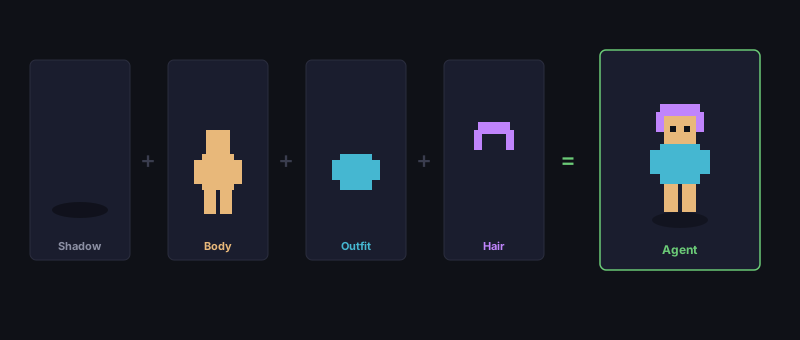
Animations use 4-frame pingpong sequences at 120ms per frame. Direction is determined by the movement vector — if dx > 0, face right; if dy > 0, face down.
We cache frame textures in a Map to avoid creating new Texture objects every tick. This keeps the garbage collector quiet and maintains smooth 60fps rendering.
The Simulation
The OfficeSimulation class runs a state machine for each agent:
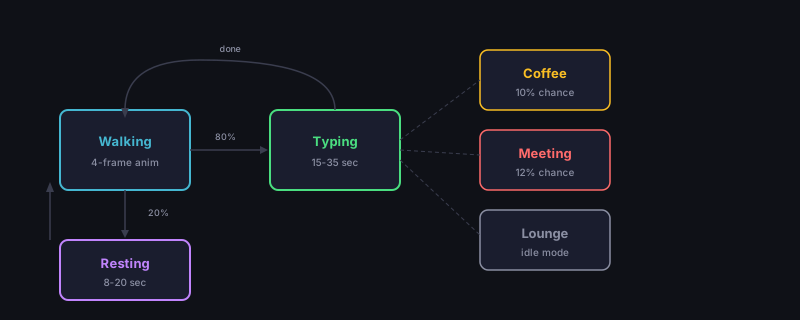
- Walking — Agent walks to their desk (A* pathfinding on a simple grid)
- Typing — Agent works for 15-35 seconds (2-frame alternating animation)
- Walking — Agent gets up and walks to a new location
- Resting — 20% chance to walk to the sofa, 80% chance to return to desk
- Repeat
The simulation runs in the PixiJS ticker's update loop, receiving deltaMs each frame. On window resize, all stationary agents are repositioned using the new layout calculations.
Positioning System
All positions are defined as image fractions — normalized coordinates relative to the source background image. For example:
CHAIR_POSITIONS[0] = { xFrac: 0.25, yFrac: 0.52 }This means "25% from the left edge, 52% from the top edge of the background image." A toCanvas() function converts these fractions to actual pixel coordinates based on the current layout.
This approach means positions survive any window size or aspect ratio change without manual adjustment.
Lessons Learned
- Nearest-neighbor scaling is essential for pixel art. We set
TextureSource.defaultOptions.scaleMode = 'nearest'globally - Frame caching matters — Without it, creating new textures every frame caused visible GC pauses
- Image fractions beat pixel coordinates — Makes the layout resolution-independent
- State machines are underrated — A simple state machine makes agent behavior feel surprisingly alive
The pixel-art office started as a fun idea and became a core part of what makes Office Claws feel different. It turns infrastructure management from a chore into something you want to watch.